IXChat Package
LangGraph-based chatbot with retrieval-augmented generation (RAG), conversation memory, and intelligent visitor enrichment.
Overview
The ixchat package provides the core chatbot functionality for the Rose platform. It uses LangGraph to orchestrate a complex workflow of specialized nodes that handle:
- Document Retrieval: Fetches relevant context from LightRAG
- Visitor Enrichment: Identifies companies from IP addresses
- Response Generation: Produces contextual answers with LLM
- Skill-Based Personalization: Applies response ending skills based on visitor signals
- Suggestion Generation: Creates follow-up questions or answer options
- Dialog Supervision: Tracks conversation state and signals
Architecture Diagram
The following diagram shows the LangGraph structure. It is auto-generated from the graph definition using Graphviz during just build or just dev.
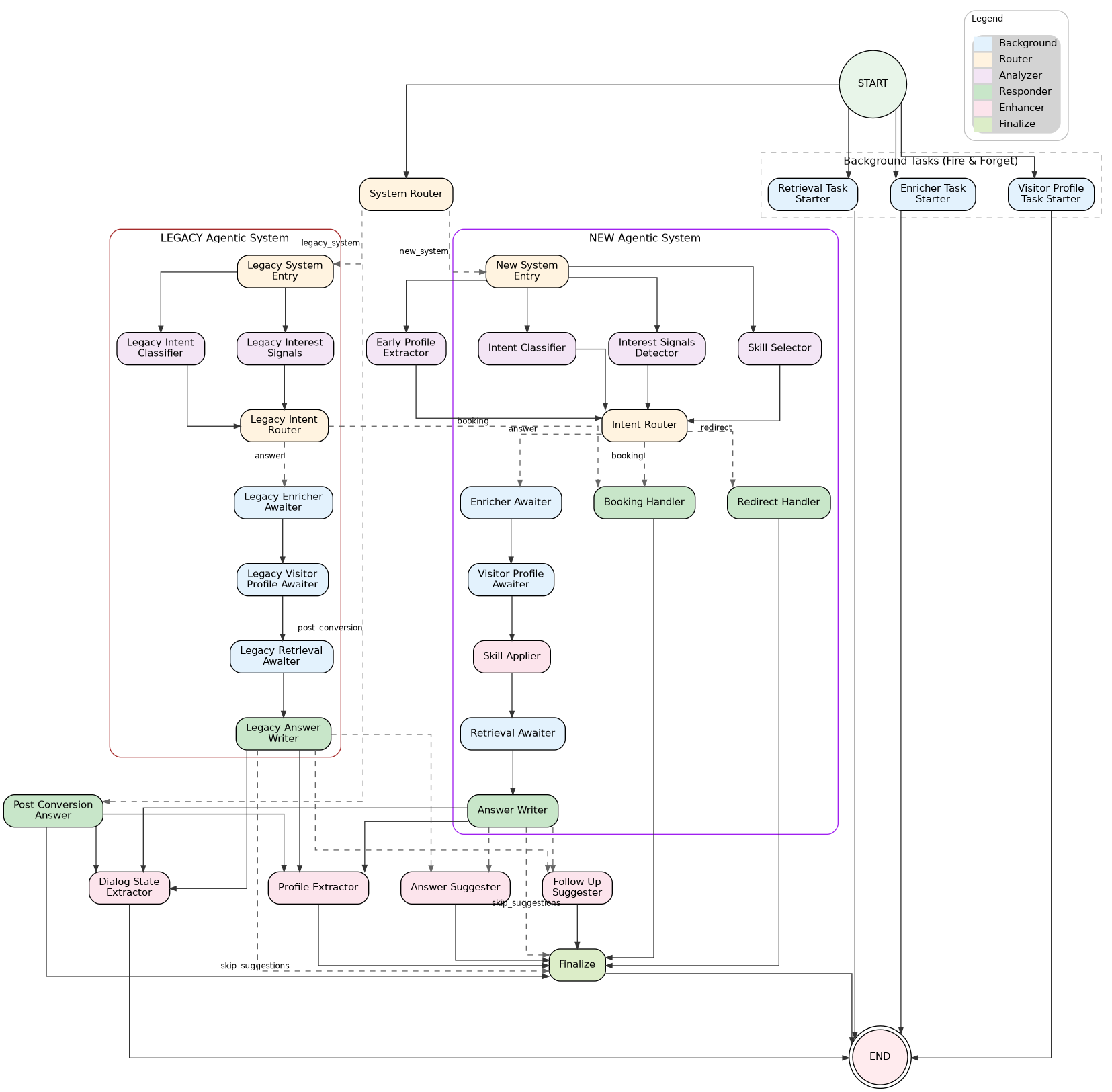
Dual System Architecture (NEW vs LEGACY)
The graph supports two execution paths determined at START by the system_router node:
| System | Environment | Features | LLM Calls |
|---|---|---|---|
| NEW Agentic | Development, or enable_new_agentic_system=true |
Skills pipeline, 3-way routing (ANSWER/REDIRECT/BOOKING) | 4 (classifier, signals, skill_selector, answer) |
| LEGACY | Production (default) | 2-way routing (ANSWER/BOOKING) via legacy_intent_router |
3 (classifier, signals, answer) |
System Selection Logic
# Development environment → always NEW system
# Non-development + enable_new_agentic_system=true in custom_config → NEW system
# Otherwise → LEGACY system
Multi-Agent Router Architecture
Overview
The multi-agent router architecture replaces the monolithic prompt approach with specialized agents for different visitor intents. Instead of one large prompt handling all scenarios, the system:
- Classifies intent using a fast LLM (gpt-4.1-nano)
- Selects response skills based on intent + interest signals (NEW system only)
- Routes to specialized handlers based on intent (ANSWER/REDIRECT/BOOKING)
- Uses 3-level prompt hierarchy for each agent (meta-template → agent template → client instructions)
Intent Classification
The intent_classifier node classifies each message into one of 5 visitor intents:
| Intent | Description | Example |
|---|---|---|
LEARN |
Product questions, feature inquiries | "How does your A/B testing work?" |
CONTEXT |
User sharing business context | "We have 50k monthly visitors" |
SUPPORT |
Existing customer issues | "I can't log into my dashboard" |
OFFTOPIC |
Unrelated to product | "What's the weather today?" |
OTHER |
Job inquiries, press, partnerships | "Are you hiring?" |
The classifier runs in parallel with other analysis nodes after system routing, using the Langfuse prompt rose-internal-intent-router.
Skill Selection (NEW System Only)
The skill_selector node (LLM) selects response ending skills based on visitor intent, interest signals, and conversation history. Skills determine how the response should end (e.g., propose demo, collect email, suggest follow-up).
The skill_applier node (deterministic logic) then applies post-processing rules with current-turn signals:
- Demo forcing: Force demo skill when booking intent detected
- CTA timing: Control when to show CTAs based on turn count
- Signal overrides: Apply current-turn interest signals to skill selection
Intent Routing
The intent_router node uses deterministic logic (no LLM) to decide the next path based on:
- Current visitor intent
- Cumulative interest score (from
interest_signals_detector) - Site-specific interest threshold (from unified
qualification.interest_signals.threshold) - Skill selection results (NEW system)
| Path | Trigger | Handler |
|---|---|---|
ANSWER |
LEARN/CONTEXT intent, product questions | answer_writer (NEW) or legacy_answer_writer (LEGACY) |
REDIRECT |
SUPPORT/OFFTOPIC/OTHER intent | redirect_handler |
BOOKING |
Demo requested, high buying signals | booking_handler |
Redirect Handler
The redirect_handler handles support, off-topic, and other requests by redirecting users to appropriate resources.
3-Level Prompt Hierarchy:
rose-internal/response-agents/meta-template (Level 1 - shared)
  └── {{lf_agent_instructions}} ← Agent template inserted
        └── rose-internal/response-agents/redirect/template (Level 2)
              └── {{lf_client_agent_instructions}} ← Client instructions inserted
                    └── rose-internal/response-agents/redirect/instructions/{domain} (Level 3)
Key features:
- Skips enrichment and retrieval: The redirect path bypasses
enricher_awaiter,visitor_profile_awaiter, andretrieval_awaiterfor ~300-500ms faster responses. - Uses gpt-4.1-nano: Optimized for fast, lightweight redirect responses.
Booking Handler
The booking_handler manages CTA and email collection flows when high buying signals are detected:
- Email collection: Prompts for email when user shows demo interest
- Lead capture webhook: Fires webhook with
capture_context="in_chat_booking"when email is first captured - PostHog tracking: Sends
rw_email_capturedevent withrw_capture_context="in_chat_booking" - CTA insertion: Adds appropriate call-to-action based on visitor profile
- Skips enrichment: Like redirect, bypasses background awaiters for faster response
Environment-Based Routing
| Environment | System | ANSWER Path | REDIRECT Path | BOOKING Path |
|---|---|---|---|---|
| Development | NEW | answer_writer |
redirect_handler |
booking_handler |
| Production (default) | LEGACY | legacy_answer_writer |
legacy_answer_writer |
booking_handler |
| Production + feature flag | NEW | answer_writer |
redirect_handler |
booking_handler |
Note: In production LEGACY mode, redirect intents still route through retrieval_awaiter → legacy_answer_writer for backwards compatibility.
Deferred Execution Pattern
The graph uses a deferred execution pattern for ALL background operations to minimize latency:
| Starter Node | Awaiter Node | Operation | Latency Savings |
|---|---|---|---|
retrieval_task_starter |
retrieval_awaiter |
RAG retrieval | ~200-400ms |
enricher_task_starter |
enricher_awaiter |
Visitor enrichment (IP lookup) | ~100-300ms |
visitor_profile_task_starter |
visitor_profile_awaiter |
Visitor profiling (LLM inference) | ~200-400ms |
How it works:
- START: All task starters fire async tasks immediately and return to END (no blocking!)
- Analysis: Analysis nodes (
intent_classifier,interest_signals_detector,skill_selector) run in parallel with background tasks - Routing:
intent_routerdecides path without waiting for background results - ANSWER path: Awaiters sequentially collect background task results before answer generation
- REDIRECT/BOOKING paths: Skip all awaiters, allowing background tasks to be cancelled (~300-500ms faster + cost savings)
This reduces latency by ~50-66% since analysis doesn't wait for slow I/O operations. Background tasks that aren't awaited can be cancelled, saving compute costs on redirect/booking paths.
Parallel Execution Architecture
Four nodes start in parallel from START (all return immediately):
START ──┬── retrieval_task_starter ────────→ END [fires async RAG task]
        ├── enricher_task_starter ─────────→ END [fires async enrichment]
        ├── visitor_profile_task_starter ──→ END [fires async profiling]
        │
        └── system_router ──→ [routes to NEW or LEGACY system]
NEW System (3 analysis nodes in parallel):
system_router ──→ new_system_entry ──┬── intent_classifier ────────────┐
                                     ├── interest_signals_detector ────┼──→ intent_router
                                     └── skill_selector ───────────────┘        │
                                                                                ├── ANSWER: enricher → visitor_profile → skill_applier → retrieval → answer_writer
                                                                                ├── REDIRECT: redirect_handler → finalize
                                                                                └── BOOKING: booking_handler → finalize
LEGACY System (2 analysis nodes in parallel - NO skill_selector for cost savings):
system_router ──→ legacy_system_entry ──┬── legacy_intent_classifier ────┐
                                        └── legacy_interest_signals ─────┼──→ legacy_intent_router
                                                                                    │
                                                                                    ├── ANSWER: legacy_enricher_awaiter → legacy_visitor_profile_awaiter → legacy_retrieval_awaiter → legacy_answer_writer
                                                                                    └── BOOKING: booking_handler → finalize
Key architecture insights:
system_routeris the SINGLE routing decision point between NEW and LEGACY systems- Background tasks fire at START and return immediately (no superstep blocking!)
- NEW system REDIRECT/BOOKING paths skip all awaiters for faster response
- LEGACY system uses
legacy_intent_routerfor 2-way routing (ANSWER/BOOKING) — BOOKING path skips awaiters like in the NEW system
Streaming Architecture
The chatbot uses a two-phase streaming approach:
Phase 1: Token Streaming (response handler)
Client ← token ← token ← token ← ... ← answer_writer/legacy_answer_writer/redirect_handler/booking_handler
- Uses LangGraph's
astream_eventsAPI to captureon_chat_model_streamevents - Only streams from response handler nodes (
answer_writer,legacy_answer_writer,redirect_handler,booking_handler) - other nodes are filtered out to avoid streaming JSON - Tokens sent as Server-Sent Events:
{"type": "token", "content": "..."}
Phase 2: Completion Event (after finalize)
After streaming completes, the API layer:
- Waits for all graph nodes to complete (including background nodes)
- Fetches final state:
chatbot.graph.aget_state(config_dict) - Extracts from state:
suggested_follow_ups- Follow-up questions fromfollow_up_suggestersuggested_answers- Answer options fromanswer_suggestercta_url_overrides- Dynamic CTA URLs fromform_field_extractorvisitor_profile- Enriched company dataskill_selection_state- Selected skills and metadata (NEW system)
- Sends completion event:
{"type": "complete", "metadata": {...}}
Why This Design?
- Fast time-to-first-token: User sees response immediately from the response handler
- Guaranteed enrichment: Awaiter nodes ensure background data is ready before answer generation
- Cancelled when unused: REDIRECT/BOOKING paths skip awaiters, allowing background tasks to be cancelled
- Complete data at end: Suggestions and metadata require all nodes to finish
Code Flow
# chatbot.py - Streams only response handler tokens
STREAMING_NODES = ("answer_writer", "legacy_answer_writer", "redirect_handler", "booking_handler")
async for event in self.graph.astream_events(...):
    if event_type == "on_chat_model_stream":
        node_name = metadata.get("langgraph_node", "")
        if node_name not in STREAMING_NODES:  # Skip other nodes (analysis, etc.)
            continue
        yield chunk.content  # Stream token to client

# chat.py (API) - Fetches final state after streaming
state = await chatbot.graph.aget_state(config_dict)
suggested_follow_ups = state.values.get("suggested_follow_ups", [])
suggested_answers = state.values.get("suggested_answers", [])
# ... send completion event with metadata
Execution Flow
NEW System Flow
-
START: Four nodes launch in parallel (all return immediately)
retrieval_task_starter- Fires retrieval task asynchronouslyenricher_task_starter- Fires enrichment task asynchronouslyvisitor_profile_task_starter- Fires profiling task asynchronouslysystem_router- Decides NEW vs LEGACY (instant check)
-
System Entry:
new_system_entrybranches to 3 analysis nodes in parallelintent_classifier- Classifies visitor intent (LLM)interest_signals_detector- Detects buying signals (LLM)skill_selector- Selects response skills (LLM)
-
Intent Routing: All 3 analysis nodes converge at
intent_router- ANSWER intent →
enricher_awaiter(continue with enrichment) - REDIRECT intent →
redirect_handler(skip enrichment, faster) - BOOKING intent →
booking_handler(skip enrichment, faster)
- ANSWER intent →
-
ANSWER Path: Sequential processing with deferred results
enricher_awaiter- Awaits enrichment taskvisitor_profile_awaiter- Awaits profiling taskskill_applier- Applies post-processing rules with current-turn signalsretrieval_awaiter- Awaits RAG retrieval taskanswer_writer- Generates skill-based response
-
REDIRECT/BOOKING Paths: Fast response (skips all awaiters)
- Handler generates response →
finalize→ END
- Handler generates response →
-
Post-Processing: After answer generation
dialog_state_extractor- Extracts emoji markers and emails → ENDform_field_extractor- Extracts form field values →finalizesuggestion_router- Routes toanswer_suggester,follow_up_suggester, orfinalize
LEGACY System Flow
-
START: Same 4 nodes as NEW system
-
System Entry:
legacy_system_entrybranches to 2 analysis nodes in parallellegacy_intent_classifier- Classifies visitor intent (LLM)legacy_interest_signals- Detects buying signals (LLM)- Note: No
skill_selector- saves one LLM call!
-
Intent Routing: Both analysis nodes converge at
legacy_intent_router- ANSWER intent →
legacy_enricher_awaiter(continue with enrichment) - BOOKING intent →
booking_handler(skip enrichment, faster)
- ANSWER intent →
-
ANSWER Path: Sequential processing with deferred results
legacy_enricher_awaiter→legacy_visitor_profile_awaiter→legacy_retrieval_awaiter→legacy_answer_writer
-
BOOKING Path: Fast response (skips all awaiters)
booking_handler→finalize→ END
-
Post-Processing: Same as NEW system
Graph Nodes
Background Task Nodes (Fire at START)
| Node | Purpose | Target |
|---|---|---|
retrieval_task_starter |
Fires RAG retrieval task asynchronously | retrieval_awaiter |
enricher_task_starter |
Fires visitor enrichment task asynchronously | enricher_awaiter |
visitor_profile_task_starter |
Fires visitor profiling task asynchronously | visitor_profile_awaiter |
System Routing Nodes
| Node | Purpose | System |
|---|---|---|
system_router |
Decides NEW vs LEGACY system based on environment/config | Both |
new_system_entry |
Entry point that branches to NEW system analysis nodes | NEW |
legacy_system_entry |
Entry point that branches to LEGACY system analysis nodes | LEGACY |
Analysis Nodes
| Node | Type | Purpose | System |
|---|---|---|---|
intent_classifier |
LLM | Classifies visitor intent (gpt-4.1-nano) | NEW |
interest_signals_detector |
LLM | Detects buying signals (engagement, pricing interest) | NEW |
skill_selector |
LLM | Selects response ending skills based on signals | NEW only |
legacy_intent_classifier |
LLM | Same as intent_classifier (different node name for clean graph) | LEGACY |
legacy_interest_signals |
LLM | Same as interest_signals_detector | LEGACY |
Routing & Processing Nodes
| Node | Type | Purpose | System |
|---|---|---|---|
intent_router |
Logic | Routes to ANSWER/REDIRECT/BOOKING based on intent + signals | NEW |
legacy_intent_router |
Logic | Routes to ANSWER/BOOKING based on booking state | LEGACY |
skill_applier |
Logic | Applies post-processing rules with current-turn signals | NEW |
enricher_awaiter |
Await | Awaits deferred enrichment task | NEW (ANSWER path) |
visitor_profile_awaiter |
Await | Awaits deferred profiling task | NEW (ANSWER path) |
retrieval_awaiter |
Await | Awaits deferred RAG retrieval task | NEW (ANSWER path) |
legacy_enricher_awaiter |
Await | Awaits enrichment (always runs in LEGACY) | LEGACY |
legacy_visitor_profile_awaiter |
Await | Awaits profiling (always runs in LEGACY) | LEGACY |
legacy_retrieval_awaiter |
Await | Awaits retrieval (always runs in LEGACY) | LEGACY |
Response Handler Nodes
| Node | Purpose | System |
|---|---|---|
answer_writer |
Generates skill-based response with RAG context | NEW |
legacy_answer_writer |
Generates response with RAG context (no skills) | LEGACY |
redirect_handler |
Handles support/offtopic/other redirects (gpt-4.1-nano) | NEW |
booking_handler |
Handles CTA/email collection flows | Both |
Post-Processing Nodes
| Node | Type | Purpose |
|---|---|---|
dialog_state_extractor |
Async | Extracts emoji markers and captured emails |
form_field_extractor |
Async | Extracts form field values for CTA URLs |
follow_up_suggester |
LLM | Generates follow-up questions |
answer_suggester |
LLM | Generates suggested answers (when bot asks questions) |
finalize |
Sync | Assembles final response for client |
State Model
The graph uses RoseChatState (TypedDict) with custom reducers for parallel updates:
Core Fields
| Field | Type | Description |
|---|---|---|
messages |
list[BaseMessage] |
Conversation history |
input |
str |
Current user input |
response |
str |
Generated LLM response |
retrieved_docs |
str |
Context from LightRAG |
site_name |
str |
Client site identifier |
session_id |
str |
Conversation session ID |
turn_number |
int |
Current conversation turn (0-indexed) |
Profile & Signals
| Field | Type | Reducer |
|---|---|---|
visitor_profile |
VisitorProfile |
merge_visitor_profiles |
dialog_supervision_state |
DialogSupervisionState |
merge_dialog_supervision_states |
interest_signals_state |
InterestSignalsState |
merge_interest_signals_states |
form_collection_state |
FormCollectionState |
merge_form_collection_states |
Intent & Router State
| Field | Type | Description |
|---|---|---|
intent_classification_state |
IntentClassificationState |
Current intent + history |
intent_router_state |
IntentRouterState |
Next route + reasoning |
next_route |
str |
Pre-computed route for conditional edges |
VisitorIntent enum values: LEARN, CONTEXT, SUPPORT, OFFTOPIC, OTHER
NextAction enum values: EDUCATE, QUALIFY, PROPOSE_DEMO, HANDLE_BOOKING, HANDLE_SUPPORT, HANDLE_OFFTOPIC, HANDLE_OTHER, CONTINUE
Skill Selection State (NEW System)
| Field | Type | Description |
|---|---|---|
skill_selection_state |
SkillSelectionState |
Selected skills + metadata |
booking_state |
BookingState |
CTA/booking flow tracking (both systems) |
Custom Reducers
Parallel nodes update state using custom merge functions:
merge_visitor_profiles: Merges enrichment results, preferring non-"unknown" valuesmerge_dialog_supervision_states: Cumulative "ever" flags + latest turn flagsmerge_interest_signals_states: Simple replacementmerge_form_collection_states: Merges collected values, tracks max turn
Memory Management
Session state is persisted using LangGraph checkpointers:
| Mode | Backend | Use Case |
|---|---|---|
| Redis | AsyncRedisSaver |
Production (distributed) |
| Memory | MemorySaver |
Development/Testing |
Configuration:
- TTL: Configurable session timeout
- Keepalive: TCP socket keepalive enabled
- Health checks: 30-second pings prevent idle disconnection
# Memory manager initialization
memory_manager = IXChatMemoryManager()
checkpointer = await memory_manager.get_checkpointer()
graph = graph_builder.compile(checkpointer=checkpointer)
Enrichment System
Multi-source visitor enrichment pipeline with priority-based fallbacks:
| Priority | Source | Description |
|---|---|---|
| 1 | Redis Cache | Fast, short-lived cache |
| 2 | Supabase Lookup | IP hash lookup for returning visitors |
| 3 | Browser Reveal | Client-side data (window.reveal) |
| 4 | Snitcher Radar | Session UUID identification |
| 5 | Enrich.so | Server-side API fallback |
Once a source returns "completed" status, remaining sources are skipped.
VisitorProfile Fields
- Enrichment:
status,tier,source,ip_address - Company:
company_name,company_description,company_domain,sector,sub_sector - User Context:
email,job_to_be_done,feature_list,intent - Confidence:
sector_confidence_level
Integration Points
| System | Purpose | Package |
|---|---|---|
| LightRAG | Document retrieval with graph & chunk ranking | ixrag |
| Supabase | Conversation storage, client configs, lead data | ixdata |
| LangFuse | Observability & tracing | ixllm |
| Azure OpenAI | LLM client | ixllm |
| Redis | Session checkpointing | ixchat.memory |
Key Files
| File | Description |
|---|---|
ixchat/__init__.py |
Public API: get_chatbot_service() |
ixchat/service.py |
IXChatbotService singleton manager |
ixchat/chatbot.py |
IXChatbot with LangGraph orchestration |
ixchat/graph_structure.py |
Graph structure (SINGLE SOURCE OF TRUTH for nodes/edges) |
ixchat/memory.py |
IXChatMemoryManager for session persistence |
ixchat/config.py |
Site configuration from Supabase |
ixchat/background_task_store.py |
Manages background tasks (retrieval, enrichment, profiling) |
ixchat/nodes/ |
Node implementations |
ixchat/nodes/intent_classifier.py |
Intent classification using LLM |
ixchat/nodes/intent_router.py |
Deterministic intent routing (ANSWER/REDIRECT/BOOKING) |
ixchat/nodes/skill_selector.py |
Skill selection using LLM (NEW system) |
ixchat/nodes/skill_applier.py |
Post-processing with current-turn rules (NEW system) |
ixchat/nodes/answer.py |
Skill-based answer generation (NEW system) |
ixchat/nodes/legacy_answer_original.py |
Legacy answer generation |
ixchat/nodes/redirect_handler.py |
Redirect agent for support/offtopic/other |
ixchat/nodes/booking_handler.py |
CTA/email collection handler |
ixchat/nodes/retrieval_task_starter.py |
Fires retrieval task at START |
ixchat/nodes/retrieval_awaiter.py |
Awaits deferred retrieval task |
ixchat/nodes/enricher_task_starter.py |
Fires enrichment task at START |
ixchat/nodes/enricher_awaiter.py |
Awaits deferred enrichment task |
ixchat/nodes/visitor_profile_task_starter.py |
Fires profiling task at START |
ixchat/nodes/visitor_profile_awaiter.py |
Awaits deferred profiling task |
ixchat/pydantic_models/ |
State definitions and reducers |
ixchat/pydantic_models/state.py |
RoseChatState main graph state |
ixchat/pydantic_models/intent_router.py |
Intent router state models |
ixchat/pydantic_models/skill_selection_state.py |
Skill selection state (NEW system) |
ixchat/pydantic_models/booking_state.py |
Booking/CTA flow state |
ixchat/enrichment/ |
Multi-source visitor enrichment |
ixchat/enrichment/unified_enricher.py |
Orchestrates enrichment pipeline |
Usage
from ixchat import get_chatbot_service

# Get singleton service
service = get_chatbot_service()

# Get chatbot for a site
chatbot = await service.get_chatbot("example-site")

# Query with streaming
async for chunk in chatbot.query_stream(
    input="Tell me about your product",
    site_name="example-site",
    session_id="session-123",
    person_id="posthog-distinct-id",
):
    print(chunk, end="")

# Non-streaming query (for evaluations)
response, metadata = await chatbot.query(
    input="What are your pricing plans?",
    site_name="example-site",
    session_id="session-123",
)
Evaluations
The just eval command runs LLM evaluation tests for quality assessment and regression testing of ixchat components using Langfuse datasets.
How It Works
Langfuse Dataset ──→ Evaluator ──→ Classifier (LLM) ──→ Results logged to Langfuse
   (labeled examples)              (real API calls)        (runs + scores)
- Test data is fetched from Langfuse datasets (labeled input/expected_output pairs)
- Evaluator runs the classifier on each dataset item
- Results are logged back to Langfuse as runs with scores (correct, confidence, F1, etc.)
- Metrics are computed (accuracy, F1, precision, recall) and asserted against thresholds
Usage
cd backend

# Run a specific evaluation
just eval intent-classifier    # Intent classification accuracy
just eval skill-selector       # Skill selection accuracy
just eval e2e-api              # End-to-end API evaluation

# Run all evaluations
just eval all
Available Targets
| Target | Langfuse Dataset | Description |
|---|---|---|
intent-classifier |
intent-classifier |
Tests intent classification (LEARN, CONTEXT, SUPPORT, OFFTOPIC, OTHER) |
skill-selector |
skill-selector |
Tests skill/action routing decisions |
e2e-api |
main-dataset |
End-to-end API response quality |
Langfuse Dataset Structure
Each dataset item in Langfuse should have:
| Field | Description | Example |
|---|---|---|
input |
Classifier input (dict or string) | {"message": "How does pricing work?", "history": [...]} |
expected_output |
Expected classification result | {"intent": "LEARN"} |
metadata |
Optional context | {"source": "production", "site_name": "example"} |
Adding Traces to Datasets
To expand test coverage, add production traces to Langfuse datasets:
Option 1: Langfuse UI
- Go to Traces in Langfuse
- Find a trace with interesting/edge-case behavior
- Click Add to Dataset → select target dataset
- Fill in the
expected_output(ground truth label)
Option 2: Langfuse API
from langfuse import Langfuse

langfuse = Langfuse()

# Add item to existing dataset
langfuse.create_dataset_item(
    dataset_name="intent-classifier",
    input={"message": "Can you help me debug?", "history": []},
    expected_output={"intent": "SUPPORT"},
    metadata={"source": "manual", "notes": "Edge case for support detection"}
)
Environment Configuration
The eval command automatically configures:
LANGFUSE_ENABLED=true- Enables Langfuse for real prompt fetchingIX_ENVIRONMENT=test- Uses test environment (overridden todevelopmentfor credentials)
Test Markers
@pytest.mark.evaluation      # Marks as evaluation test
@pytest.mark.llm_integration # Requires real LLM API calls
Running just eval all filters: -m "evaluation and llm_integration"
Results in Langfuse
After running evaluations, results appear in Langfuse:
| Score | Description |
|---|---|
correct |
Per-item: 1.0 if prediction matches expected, 0.0 otherwise |
confidence |
Per-item: Model confidence score (if available) |
macro_f1 |
Aggregate: Macro-averaged F1 score across all classes |
weighted_f1 |
Aggregate: Weighted F1 score |
accuracy |
Aggregate: Overall accuracy |
passed |
Aggregate: 1.0 if F1 >= threshold, 0.0 otherwise |
Quality Thresholds
Default thresholds (configurable in conftest.py):
| Metric | Threshold | Description |
|---|---|---|
| Macro F1 | 0.80 | Overall classification quality |
| Min Class F1 | 0.60 | No single class below this |
| Skill Recall | 0.90 | Multi-label skill coverage |
| Answer Accuracy | 0.70 | E2E response quality |